


Ongoing platform
Keep your whole team on one simple platform
The Induction App isn't just for new starters. Get set up with onboarding, and then add your existing people too to get everyone on the same page, and keep everything in one place. It holds your HR files, policies, culture and compliance for the whole team, so you don't need a separate system for each job.
Trusted by lean HR and operations teams
Swap spreadsheets and paper files for one platform
Separate people systems can mean too much to pay for, learn and keep in sync. For smaller teams, the alternative is often information scattered across spreadsheets, email, PDFs and paper files.
Less scattered information
Bring people, files, policies and compliance together in one place.
Fewer systems to manage
Reduce the cost and complexity of keeping separate tools in sync.
A platform your team already knows
Keep using The Induction App beyond onboarding, without introducing another system to learn.
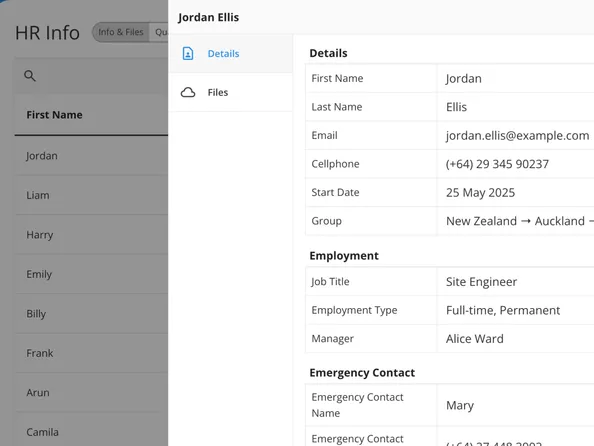
Store every HR file in one place
Keep every HR form and file together against the right person, from contracts and ID to signed policies and forms. Build forms from documents you already use, collect them online, and store the completed version on the employee's record. No more paper files or hunting through shared drives.
- Turn existing documents into online forms
- Collect information and signatures digitally
- Keep completed files on each employee record
- Store everyone's HR information and files in one place
What it’s done is refined process by automation, created consistency and elevated our training standards across the group.
 Franchisee System Support, Driving Miss Daisy
Show managers only what they need
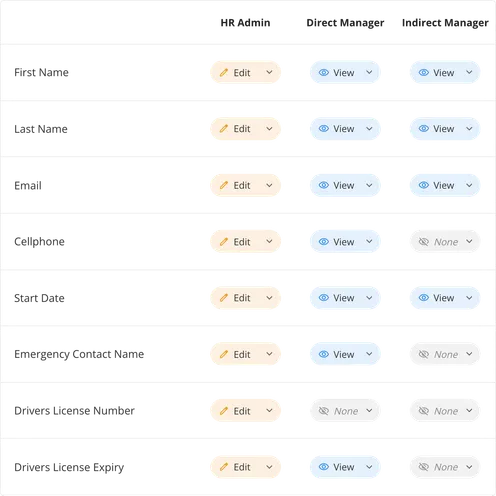
Give direct and indirect managers the people information relevant to their role, and hide the rest. Choose what each manager sees, such as emergency contacts, qualifications, key dates or medical notes, so the right person has the right detail without exposing everything.
Set access to view or edit by role and responsibility
Share emergency info, key dates and quals
Keep sensitive details private
Align existing staff on policies and culture
Your existing team may never have seen the content new starters get. Share your policies, culture and ways of working with everyone, and vary what different groups see.
Embed policies, culture and ways of working
Ensure org-wide understanding and capture proof
Target content to the right people through groups and tags

Record quals and monitor renewals
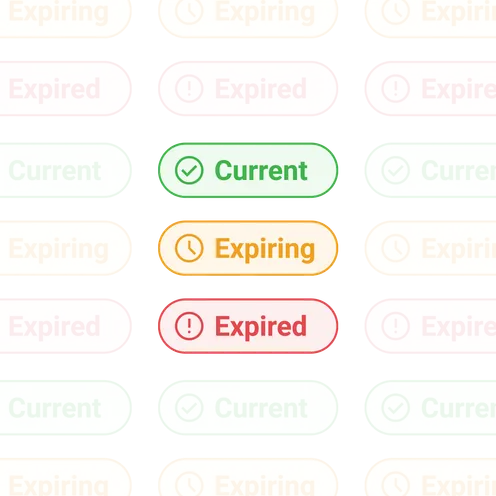
Record your team's qualifications and licences, and keep the details in one place. Monitor expiry dates so you can act before something lapses, rather than finding out after it has.
Capture qualifications and licences per person
Track expiry dates across your team
Set automatic reminders of upcoming renewals
Automate policy refreshers and renewals
Set policies and topics to refresh on a schedule, so recurring requirements come around automatically.
Schedule refreshers
Choose which policies and topics recur, and how often.
Notify the right people
Let everyone, or just certain groups, know when something changes or new topics are added.
Collect acknowledgements and completions
Ask people to acknowledge or complete by a specified date for compliance. They get reminded, and you can see who's done it and who hasn't.
Keep sensitive people data secure
Your team's information, including medical and personal details, is held securely, with access set by role privileges. People only see what they're allowed to, and important activity is recorded.
- Personal details held securely
- Access set by role privileges
- People only see what they're allowed to
- Important activity recorded




See how The Alternative Board Australia uses staged learning to onboard more franchisees at once, with less admin and more room for personal support.
“If you care about your brand, and you have people you don't have direct control over, you need to invest in their learning journey.” —CEO and Master Franchisor
Explore the rest of the platform
The ongoing platform sits alongside everything else the Induction App does.
Frequently Asked Questions
Do I still need a separate HRIS or LMS?
For many smaller teams, no. The Induction App covers the core people jobs in one place. But for larger companies, they may already have an ATS, HRIS and LMS, yet the onboarding journey is not getting the importance it deserves.
Can I add people who've already onboarded?
Yes. Add your existing team and show only what applies to them.
Can I move my existing files in?
Yes. Upload and store agreements, forms and documents against each person.
Can I control what managers see?
Yes. Access is set by role privilege, so managers see only what's relevant.
How long does setup take?
After the 90-minute Set Up meeting, your platform can be set up and configured for you within a week. From there you can continue to build out your content and other aspects. If we're involved, you can go live within one month.